
Imagine having fifty open orders — some placed manually, some through Split Order — with no stop-loss set on any of them. Setting each one individually would take forever, especially when orders overlap on the chart. One mistake or delay, and your risk exposure is completely unmanaged.
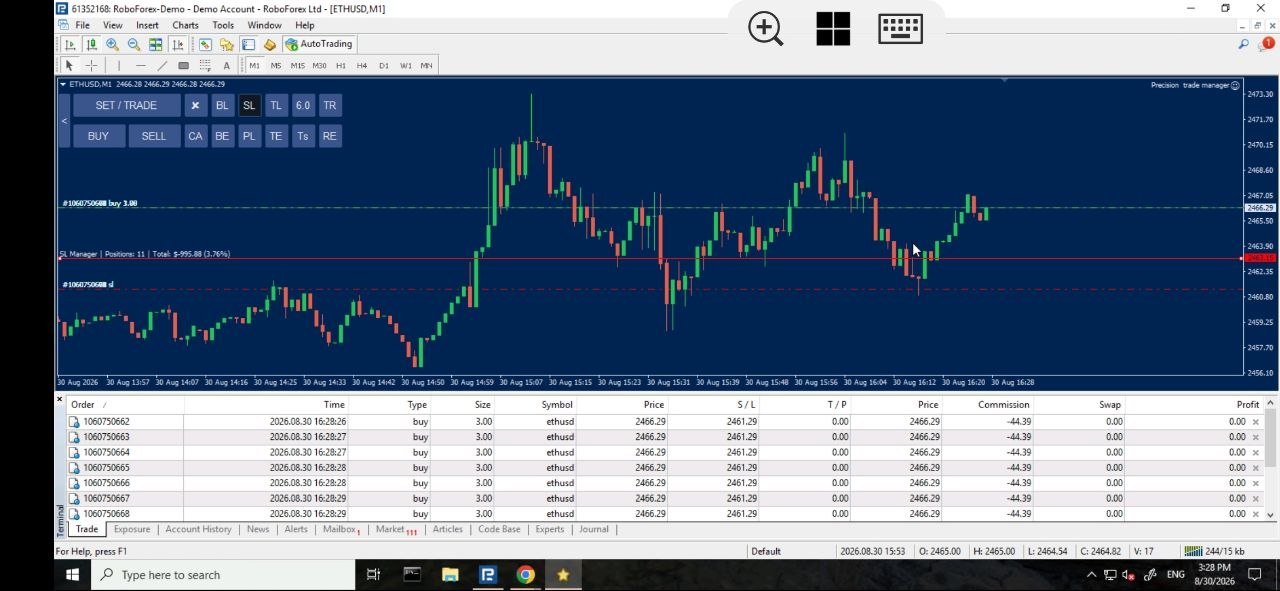
SL Manager: One Line Manages Every Stop-Loss
Click “SL,” and the EA draws a single stop-loss manager line on the chart. As you drag it, it shows you the total dollar risk across all your orders in real time — whether you’re trailing into loss or into profit. Once the line is exactly where you want it, click again: every stop-loss across every order is instantly moved to that line. There’s no limit to how many orders it can update at once, and the moment the transfer is complete, the line disappears automatically.
What Does the SL Manager EA Actually Do?
- Draws a single, draggable line that controls the stop-loss of every open order at once
- Displays your total dollar risk live as you move the line, in profit or in loss
- Second click instantly moves every order’s stop-loss to the line’s position — no limit on the number of orders
- The line automatically disappears once the transfer is complete
- Only applies to orders in the direction (buy or sell) you position the line on — the opposite direction is left untouched
- Works seamlessly even if some orders already have a stop-loss and others don’t
How It Works (Step-by-Step Guide)
- Click “SL” on the EA — a stop-loss manager line appears on the chart
- Drag the line to your desired level while watching your live total dollar risk update
- Click “SL” again to confirm
- Every open order in that direction has its stop-loss moved to the line instantly
- The line disappears automatically once the update is complete
Why This Beats Manual Stop-Loss Management
| Manual Stop-Loss Management | SL Manager EA |
|---|---|
| Setting each order’s stop-loss one by one | One line updates every order at once |
| No live view of total dollar risk while adjusting | Total dollar risk shown in real time as you drag the line |
| Difficult when orders overlap on the chart | Works instantly no matter how many orders are open |
Frequently Asked Questions
Does the SL Manager work if some orders already have a stop-loss?
Yes. It updates every order in the selected direction, regardless of whether they already had a stop-loss set or not.
Does it affect both buy and sell orders at the same time?
No. The line only affects orders in the direction you place it — buy orders or sell orders, depending on where you position it on the chart.
Is there a limit to how many orders it can update?
No. Whether you have five orders or five hundred, the SL Manager updates all of them instantly with a single click.
What happens to the line after the stop-losses are updated?
It’s removed automatically the moment the transfer to all orders is complete.
Does this work with all brokers?
Yes, as long as your broker supports MetaTrader 4 or the official MetaTrader platform.
Manage Every Stop-Loss With One Line
[CTA Button: Download / Buy Now / View Pricing]
Related Tools
Pair the SL Manager with the TP Manager to control every take-profit the same way, or the Partial Manager to lock in gains across all your open orders at once.
Professional traders understand that minimizing drawdowns and controlling open risk dynamically is the cornerstone of long-term consistency. By integrating the SL Manager EA alongside your daily analysis, you remove the emotional hesitation of closing or modifying individual stop-losses during volatile market swings. Whether you are scalping lower timeframes or holding swing positions across major currency pairs, automating your risk parameters ensures precision execution every time.