
Using the loss breakeven ea mt5 mt4, this is how Trade Manager MT5 MT4’s Loss Breakeven feature works. When the market moves against your position, watching a winning trade turn into a loss is one of the most frustrating parts of trading successfully. In that critical moment, exiting with zero cost — rather than a painful loss — can make all the difference, especially across multiple open orders at once.
Exit at Zero Cost, Instantly
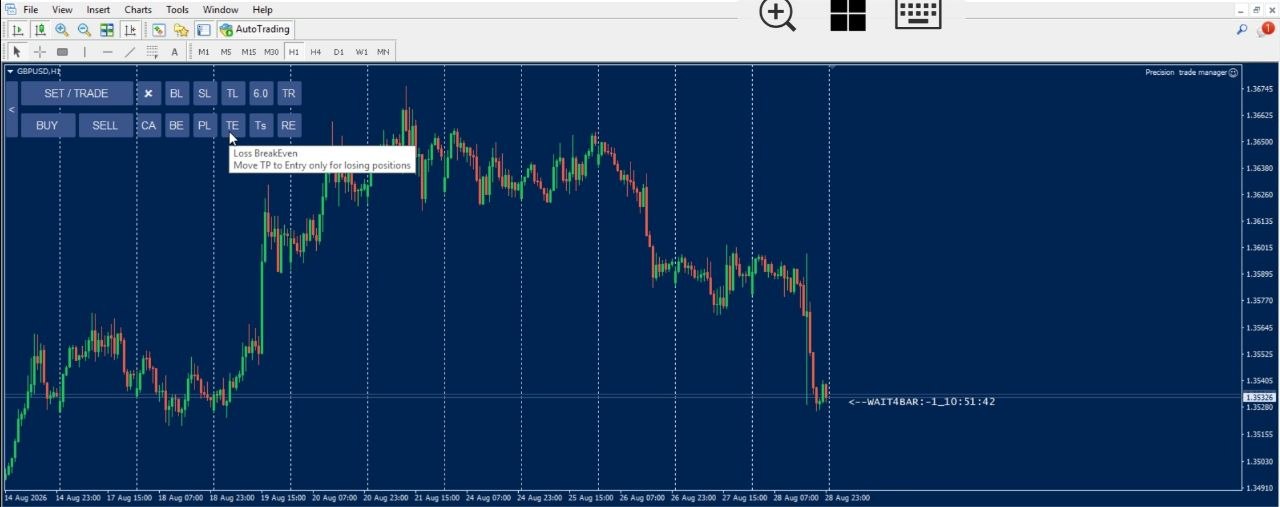
If price moves against your entry, click “TE,” and the loss breakeven ea mt5 mt4 instantly moves every open position’s take-profit to its exact breakeven point — fully accounting for commission and swap on each order individually. The moment price reaches that level, you exit the trade at zero cost, with no loss and no need to calculate anything yourself.
What Does This Loss Breakeven EA MT5 MT4 Do?
- Moves the take-profit of every open position to its precise breakeven level with a single click
- Calculates commission and swap for each order individually — never a single averaged level for all trades
- Works instantly across all open positions, no matter how many are open
- Lets you exit a trade that’s moved against you with zero cost, instead of taking a loss
- Works on all currency pairs, gold, indices, and crypto on MetaTrader 5 or MetaTrader 4
How It Works (Step-by-Step Guide)
- Open a trade as normal on MetaTrader
- If price starts moving against your entry, click “TE” on the EA
- The EA instantly sets the take-profit of every open position to its breakeven point, factoring in commission and swap
- If price returns to that level, the trade closes automatically at zero cost — no loss taken
Why This Beats Manually Watching a Losing Trade
| Manual Monitoring | Loss Breakeven (TE) |
|---|---|
| Requires constantly watching the chart as price moves against you | One click sets your exit point instantly |
| Manually calculating commission and swap for an exact breakeven level | Calculated automatically and individually for every order |
| Risk of taking an unnecessary loss while deciding what to do | Locks in a zero-cost exit the moment you click |
Built for Fast-Moving Markets
When a trade turns against you, every second spent deciding what to do is a second closer to a bigger loss. Deploying the loss breakeven ea mt5 mt4 removes that decision entirely — one click, and every open position is instantly set to exit at zero cost the moment price recovers. No manual math, no second-guessing which order needs what adjustment. It’s the difference between reacting fast and reacting right in volatile market conditions.
Frequently Asked Questions
What does the TE button actually do?
It moves the take-profit of every open position to its exact breakeven point, so that if price returns to that level, you exit the trade at zero cost instead of taking a loss using the loss breakeven ea mt5 mt4.
Does it account for commission and swap?
Yes. Each order’s breakeven level is calculated individually, factoring in its own commission and swap — never a single blanket level applied to all trades.
Does this work if I have multiple open positions?
Yes. Clicking “TE” applies instantly across every open position at once, regardless of how many you have.
What’s the difference between this and the regular Breakeven EA?
Loss Breakeven (TE) is specifically designed for moments when price has moved against your entry, letting you set an immediate zero-cost exit point across all open trades with a single click.
Does this work with all brokers?
Yes, as long as your broker supports MetaTrader 5 or MetaTrader 4.
Turn a Losing Move Into a Zero-Cost Exit with Trade Manager MT5 MT4
[CTA Button: Download / Buy Now / View Pricing]
Related Tools
Pair Loss Breakeven with the Breakeven EA for profit-side protection, or SL Manager for full manual stop-loss control.