
Split Order EA ensures that your automated workflows remain unimpeded, allowing you to scale capital efficiently without ever bumping into volume restrictions.
Every broker sets a maximum lot size per single order. As long as your risk percentage keeps your position size under that cap, a single order works fine. But as your account balance grows, a single order at your risk percentage can easily exceed the broker’s maximum — leaving you stuck, unable to enter the trade at your intended risk level.
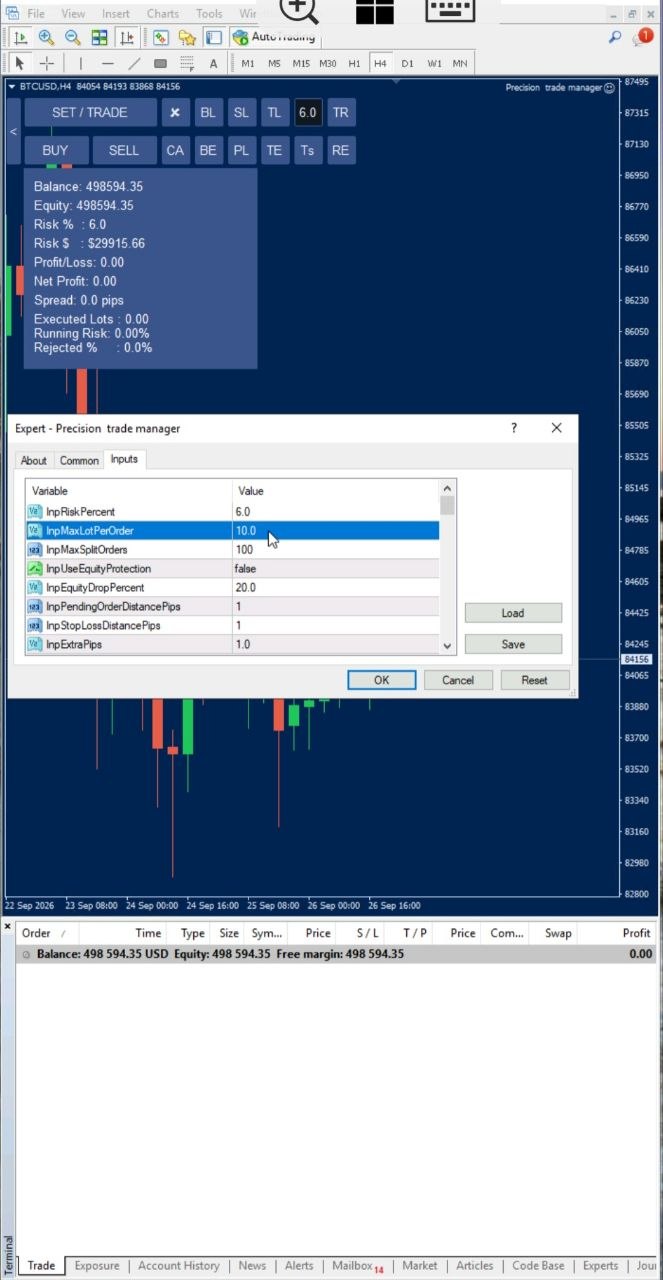
The Split Order EA Solves This Instantly
With Split Order, you place just one order and one stop-loss — exactly as you always have. In the background, the EA automatically calculates your full position size based on your risk percentage and stop-loss, then breaks that single position into as many smaller orders as needed and sends them all into the market in a fraction of a second.
You stay in control of how the position is split. You can configure the maximum lot size for each individual order and set the maximum number of split orders. PTM automatically distributes the calculated position size across the required number of orders according to your settings.
What Does This EA Actually Do?
- Automatically detects when your calculated lot size exceeds your broker’s maximum per-order limit
- Calculates the required position size based on your configured risk percentage and stop-loss
- Splits the position into multiple smaller orders behind the scenes
- Lets you configure the maximum lot size for each individual order
- Lets you configure the maximum number of split orders
- Sends all split orders into the market within a fraction of a second
- Keeps a single stop-loss and single entry — you only manage one trade, not dozens
- Works seamlessly as your account balance grows, with no manual intervention needed
How It Works (Step-by-Step Guide)
- Set your risk percentage as usual in the EA settings
- Place your entry and stop-loss on the chart — just like a normal trade
- The EA calculates your full position size based on your risk percent
- Configure your preferred maximum lot size per order and maximum number of split orders
- If that size exceeds your broker’s per-order maximum, the EA automatically splits it into multiple orders
- All orders are sent instantly, with your single stop-loss applied across the full position
Example: How Split Order Works
Suppose your risk settings calculate a 250-lot position, while your broker allows a maximum of 50 lots per order. PTM automatically distributes the calculated position across 5 orders, while your original entry, stop-loss and risk calculation remain based on the full 250-lot position.
You can also configure a smaller maximum lot size per order or set a maximum number of split orders according to your trading requirements.
Why Order Splitting Matters as Your Account Grows
| Without Split Order | With Split Order EA |
|---|---|
| Trade blocked or under-sized once you hit the broker’s lot cap | Full position size achieved automatically, distributed across multiple orders |
| Manually calculating and placing multiple orders | Hundreds of orders placed automatically with a single click |
| Inconsistent risk as balance grows | Risk percentage stays accurate at any account size |
| Fixed order size with no control over the split | Maximum lot size and maximum split orders are configurable |
Frequently Asked Questions
Why would my order need to be split in the first place?
Brokers cap the maximum volume allowed on a single order. As your account balance increases, your calculated position size (based on your risk percent) can exceed that cap — even though your risk percentage itself hasn’t changed.
Do I need to place multiple orders myself?
No. You place one order with one stop-loss, exactly as normal. The EA handles all the splitting and order placement automatically in the background.
Can I control how the position is split?
Yes. You can configure the maximum lot size for each individual order as well as the maximum number of split orders. The EA then automatically distributes the calculated position size according to your settings.
How fast are the split orders sent?
All split orders are sent into the market within a fraction of a second, so there’s no meaningful delay compared to placing a single order.
Does this work with any broker?
Yes, as long as your broker supports MetaTrader 4 or the official MetaTrader platform.
Trade at Any Account Size, With One Click
[CTA Button: Download / Buy Now / View Pricing]
Related Tools
Start with the Risk Manager to calculate your ideal position size, then use the SL Manager or Partial Manager to control every split order at once.
As independent retail and proprietary traders scale their capital across multiple accounts and expand their trading volume, running into broker lot-size limits becomes an unavoidable technical bottleneck. Automating your order distribution ensures that execution remains completely frictionless during high-impact news events or rapid market momentum phases. By completely removing the need to manually slice trading volumes or calculate broker caps, you protect your trading edge, eliminate execution delays, and maintain a consistent risk architecture across every single open position you manage.