
Close All Pending Orders MT4 MT5 – Powerful CPL Price Line
Close All Pending Orders MT4 MT5 is now easier with the new CPL – Close Pending Orders Line feature in Precision Trade Manager.
Close All Pending Orders MT4 MT5 with CPL
Managing multiple pending orders can become difficult when the market starts moving quickly. Precision Trade Manager now adds a new CPL – Close Pending Orders Line feature that allows traders to define a specific price level where all pending orders should be deleted automatically.
The original × Close All Pending Orders function is still available. CPL simply adds another way to manage pending orders when you want the action to happen at a specific price level.
Set the CPL line → Price reaches the line → All pending orders are deleted.
What Is CPL?
CPL stands for Close Pending Orders Line.
When you activate CPL, Precision Trade Manager creates a horizontal white dotted line directly on the chart. You can move this line to the exact price level where you want your pending orders to be removed.
When market price reaches the CPL line, Precision Trade Manager automatically deletes the pending orders.
The price can reach the line from either direction.
How Close All Pending Orders MT4 MT5 Works
The existing × button in Precision Trade Manager was originally designed to immediately remove all pending orders.
With the new update, clicking the × button opens a small two-button panel.
× Close All Pending Orders
The first button keeps the original functionality.
Click the × button to immediately delete all pending orders.
This is useful when you want to remove your pending orders manually and instantly.
CPL – Close Pending Orders Line
The second button activates the new CPL function.
Click CPL and Precision Trade Manager creates a horizontal white dotted line on the chart.
Move the line to your chosen price level. When price reaches the line, all pending orders are automatically deleted.
Close Pending Orders When Price Reaches a Specific Level
Imagine that you have several Buy Stop, Sell Stop, Buy Limit, or Sell Limit orders waiting on the chart.
You may decide that if price reaches a particular level, those pending orders should no longer remain active.
Instead of manually monitoring the chart and deleting every pending order, you can activate CPL and place the line at that price level.
Price reaches CPL level → All pending orders are deleted.
CPL provides a simple visual way to define the price level at which pending orders should be removed.
Price Can Touch the CPL Line From Either Direction
CPL is not limited to one direction.
The line can be reached from above or below. The important condition is that market price reaches the CPL level.
Price From Above
Price moves downward and reaches the CPL line. The pending orders are automatically deleted.
Price From Below
Price moves upward and reaches the CPL line. The pending orders are automatically deleted.
Close All Pending Orders MT4 MT5 – Video Demo
Watch the demonstration below to see how the new Close Pending Orders Line works in Precision Trade Manager.
CPL Close Pending Orders Line Screenshot
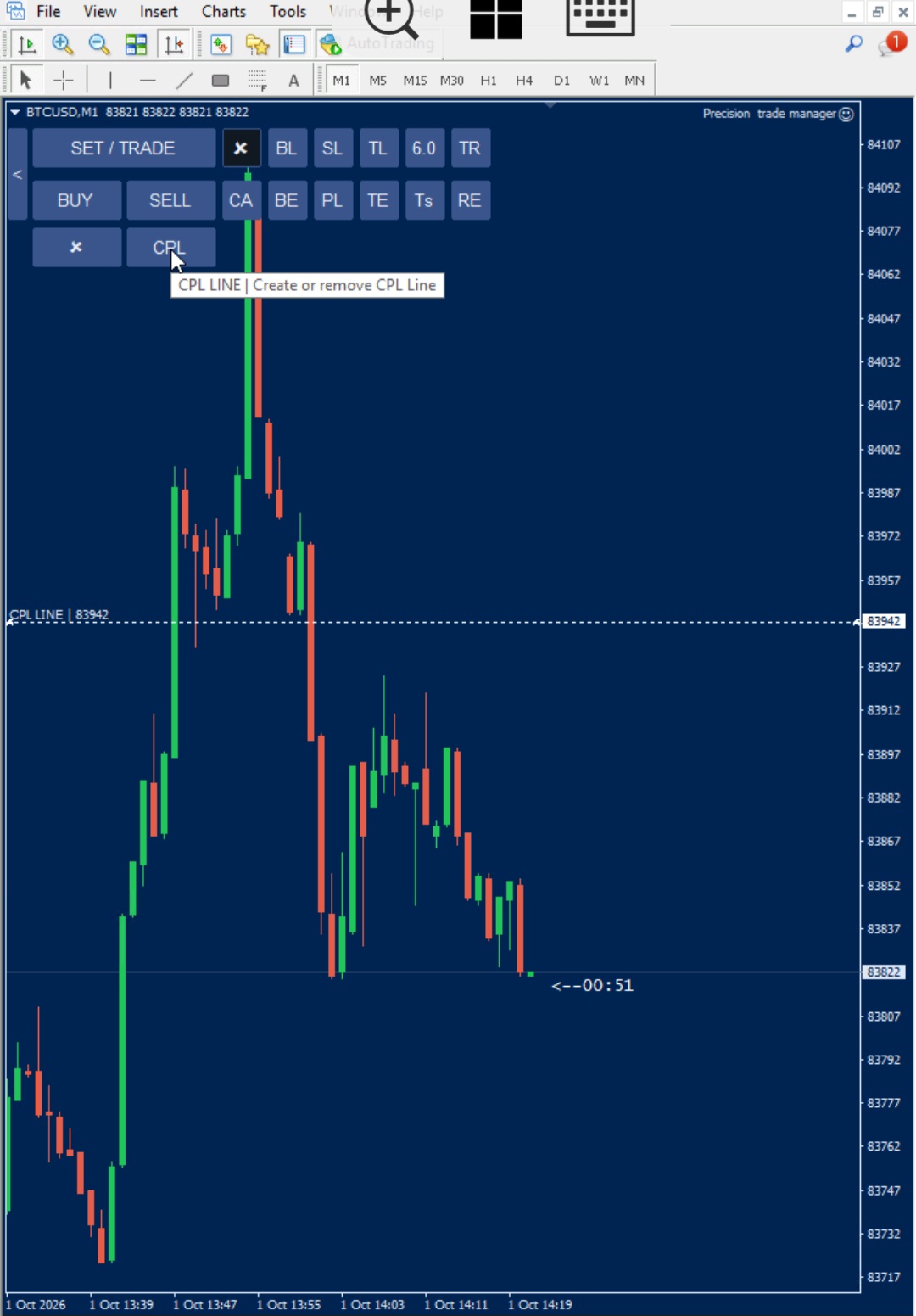
Why Use CPL Instead of Manually Deleting Pending Orders?
When multiple pending orders are active, manually deleting them one by one can take unnecessary time, especially when the market is moving quickly.
Precision Trade Manager combines the traditional immediate Close All Pending Orders function with a visual, price-based option.
- Delete all pending orders immediately using ×.
- Define a specific price level using CPL.
- Let the trade manager automatically delete the pending orders when price reaches that level.
- Monitor the selected price level visually directly on the chart.
Close Pending Orders on Price Touch
CPL is designed for situations where your pending-order setup is only valid while price remains within a specific area of the market.
Instead of constantly watching the chart and deciding when to remove your pending orders, you can place a visual price level directly on the chart.
Once price reaches that level, the pending orders are automatically deleted.
MT4 & MT5 Pending Order Management
Precision Trade Manager is designed as a professional trade management tool for MetaTrader 4 and MetaTrader 5.
The Close All Pending Orders MT4 MT5 functionality provides fast manual control, while CPL adds a price-level trigger for situations where you want the pending orders to be deleted automatically when price reaches a predefined level.
For official information about the MetaTrader platform, visit the official MetaTrader 4 website .
Simple Two-Mode Pending Order Control
Immediate Control
Use:
Use this option when you want to delete the pending orders immediately.
Price-Based Control
Use:
Use this option when you want the pending orders to remain active until price reaches a specific level.
Key Features
- Close All Pending Orders MT4 MT5 using the existing × button
- New CPL – Close Pending Orders Line function
- Horizontal white dotted CPL price line
- Position the CPL line directly on the chart
- Price can reach the CPL line from above or below
- Automatically delete pending orders when price reaches the CPL level
- Visual price-based pending order management
- Designed for professional MT4 and MT5 trade management
A Practical Example
Suppose you have several pending orders waiting for a market move. You decide that these orders should remain active only while price stays within a specific area.
Activate CPL and place the line at your chosen price.
If the market moves upward and touches the CPL line, the pending orders are deleted automatically.
If the market approaches the line from the opposite direction, the same price-touch principle applies.
More Than Just a Close Button
The original × function was designed for immediate action. CPL adds another layer of control without replacing the original function.
Immediate Deletion
× → Delete Pending Orders Now
Remove all pending orders immediately with the original function.
Price-Triggered Deletion
CPL → Set Price Level → Price Touches Line
Let Precision Trade Manager automatically delete the pending orders when price reaches the selected level.
Precision Trade Manager
CPL is part of the broader trade-management functionality available in Precision Trade Manager, a professional trade management solution for MetaTrader 4 and MetaTrader 5.
Precision Trade Manager brings multiple order and risk-management functions together in a single interface, allowing traders to manage positions and pending orders directly from the chart.
Explore Precision Trade Manager
Discover the complete MT4 and MT5 trade-management system.
Precision Trade Manager Risk Manager EAFrequently Asked Questions
What does CPL mean in Precision Trade Manager?
CPL means Close Pending Orders Line. It creates a horizontal price line that automatically deletes pending orders when price reaches the line.
What happens when price touches the CPL line?
When market price reaches the CPL level, Precision Trade Manager automatically deletes the pending orders.
Can price reach the CPL line from either direction?
Yes. The CPL line works when price reaches it from above or from below.
Does the × button still close pending orders immediately?
Yes. The original × function remains available. Clicking × opens the two-button panel where you can choose the normal Close All Pending Orders function or CPL.
Is CPL the same as Close All Pending Orders?
Not exactly. Close All Pending Orders removes pending orders immediately, while CPL allows you to define a price level first and automatically remove the pending orders when price reaches that level.
Can CPL manage multiple pending orders?
Yes. CPL is designed to automatically remove the pending orders when the defined price level is reached.
Is CPL available for MT4 and MT5?
CPL is part of the Precision Trade Manager trade-management functionality for MetaTrader platforms.
Take Control of Your Pending Orders
With Close All Pending Orders MT4 MT5, traders can remove pending orders immediately or use the CPL price line to automatically delete them when price reaches the selected level.
CPL for price-based control.
Precision Trade Manager
Professional Trade & Risk Management for MT4 and MT5.
Visit Precision Trade Manager Risk Manager EA