
A cluttered, messy chart full of overlapping lines, colors, and indicators makes trading harder than it needs to be. Most retail and professional traders spend valuable time manually cleaning up their charts, adjusting color schemes, and removing unwanted elements before they can even focus on the market analysis itself. The Self-Template EA eliminates this repetitive chore entirely by automating your workspace setup from the moment it is loaded onto your terminal, saving you precious minutes before every trading session.
Whether you trade major currency pairs, volatile commodities like Gold, global indices, or cryptocurrencies, having a standardized and pristine visual interface helps you maintain high focus. Manual template configuration across multiple charts can quickly become frustrating, especially when switching between different timeframes and broker templates. This expert advisor ensures consistency across your entire MetaTrader environment effortlessly.
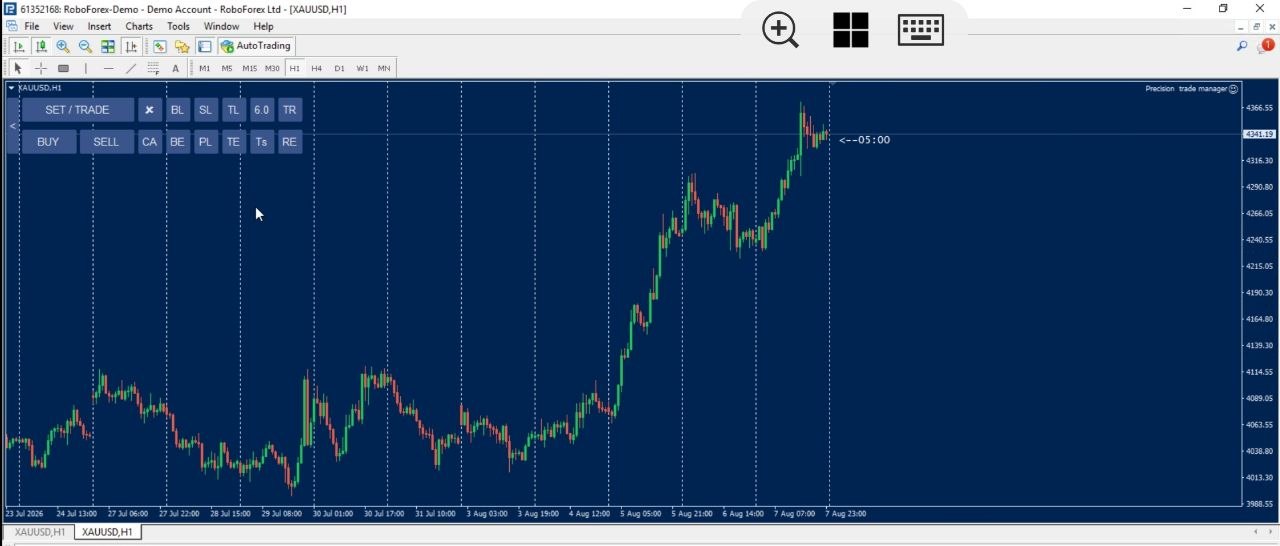
A Clean Chart, the Moment You Load the EA
The moment you attach the Self-Template EA to any chart, it automatically applies its own professionally designed template — instantly transforming a cluttered, disorganized chart into a clean, visually clear workspace. If you prefer to keep your own custom chart setup, indicators, and color preferences, you can simply disable this feature in the input settings, and the EA will leave your existing template completely untouched.
Clean visual tracking is essential when executing fast-paced strategies using advanced tools like the Risk Manager or SL Manager. By utilizing the Self-Template EA, you ensure that every new chart window you open presents a uniform, distraction-free environment optimized for high-concentration trading sessions.
What Does This EA Actually Do?
- Automatically applies a professionally designed template the moment the Self-Template EA is attached to a chart
- Instantly cleans up cluttered or disorganized charts into a clear, professional layout
- Fully optional — can be disabled from the input settings if you prefer to keep your own chart template
- Requires no manual setup, file importing, or complex configuration to use
- Works reliably across currency pairs, commodities, indices, and cryptocurrency charts
How It Works (Step-by-Step Guide)
- Attach the Self-Template EA to any chart in MetaTrader 4 or MetaTrader 5
- The EA automatically reads its built-in parameters and applies its template to that chart
- Your chart is instantly transformed into a clean, organized, distraction-free layout
- If you’d rather keep your own template, simply disable this feature in the EA’s input settings
Why This Beats Manually Cleaning Up Your Chart
| Manual Chart Setup | Self-Template EA |
|---|---|
| Time spent manually removing grid lines, changing colors, and adjusting indicators | Applied automatically the exact instant the EA is attached to the chart |
| Inconsistent visual setup across different charts and timeframes | Same clean, professional layout every single time you open a window |
| No easy way to revert without redoing templates manually across profiles | Can be toggled off instantly with a single input setting if not wanted |
Frequently Asked Questions
Do I need to set anything up for this to work?
No. The template is applied automatically the moment you attach the Self-Template EA to a chart — no manual file saving or configuration needed.
What if I already have my own custom chart template?
You can easily disable this feature in the EA’s input settings, and your existing custom template and indicator setup will be left completely untouched.
Does this affect the EA’s trade management functionality in any way?
No. This is purely a visual feature designed for chart organization and has zero effect on how the EA handles your orders, stop-losses, or risk calculations.
Does this work with all brokers?
Yes, as long as your broker supports MetaTrader 4 or the official MetaTrader platform.
Start With a Clean Chart, Every Time
[CTA Button: Download / Buy Now / View Pricing]
Related Tools
Pair the Self-Template EA with our other modular tools like Breakeven and Trailing Stop for a complete, streamlined automated trading experience.