
Cancel Pending Orders When Price Touches a Line — MT5 & MT4
Automatically Cancel Pending Orders When Price Reaches Your Break-Even Line
Precision Trade Manager provides a visual Break-Even management system for MetaTrader 5 and MetaTrader 4. The system includes two powerful options inside the BL panel: BL and BLC.
BL — Break-Even Manager
BLC — Break-Even Pending Order Cleaner
BLC is designed for traders who want to cancel pending orders automatically when market price touches a predefined Break-Even Line. In addition to cancelling pending orders, BLC performs the same Break-Even management functions provided by the standard BL function.
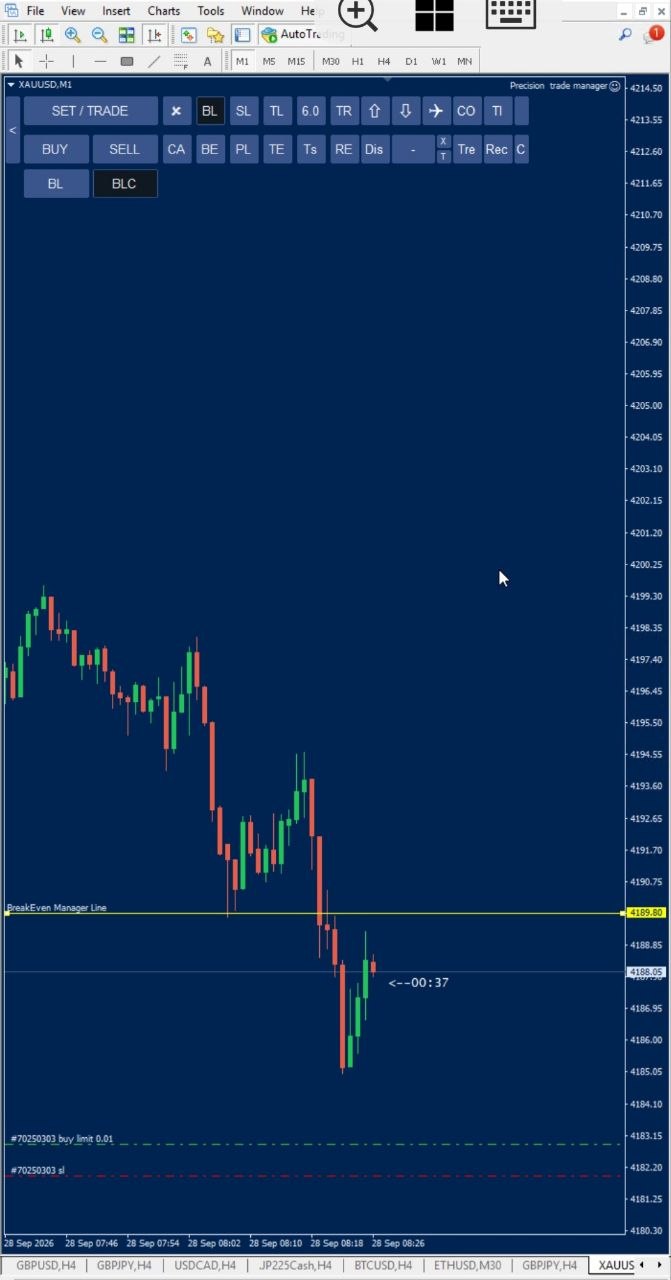
How BLC Works
1. Click the BL Button
Click the BL button in Precision Trade Manager to open the Break-Even management panel.
Inside the panel, you will find two options:
- BL — Standard Break-Even Manager
- BLC — Break-Even Manager + Pending Order Cleaner
Both options use a visual Break-Even Line. The difference is what happens when market price reaches that line.
2. Choose BL or BLC
The standard BL function provides normal Break-Even management. It allows traders to use a clearly visible line on the chart as a predefined management level.
BLC includes everything provided by BL, but adds automatic pending-order cancellation. If your trading plan requires you to cancel pending orders when price reaches a specific level, BLC can perform that action automatically.
3. Set the Break-Even Line
After selecting the desired function, the Break-Even Line is displayed directly on the chart. The line provides a clear visual price level for managing the active trade.
Instead of manually watching the market and deciding when to cancel pending orders, the trader can use the BLC line as the predefined trigger.
4. Price Touches the Line
When market price reaches the Break-Even Line, the selected function performs its corresponding action.
BL: Performs the normal Break-Even management.
BLC: Performs everything BL does and automatically cancels pending orders when price touches the line.
This creates a simple and clear workflow:
Break-Even Management + Automatic Pending Order Cleanup
BL vs BLC
| Function | BL | BLC |
|---|---|---|
| Break-Even Line | ✓ | ✓ |
| Break-Even management | ✓ | ✓ |
| Visual price level | ✓ | ✓ |
| Line-touch trigger | ✓ | ✓ |
| Automatic Pending Order cancellation | — | ✓ |
Why Use BLC?
Consider a trading setup where you have an active position and one or more pending orders waiting for another possible market scenario.
Once the market reaches your predefined Break-Even level, you may no longer want those pending orders to remain active. Instead of manually monitoring the chart and trying to cancel pending orders at exactly the right moment, BLC can handle the pending-order cleanup automatically.
The BLC Break-Even Line becomes the predefined trigger. When price touches the line, the EA performs the normal Break-Even management and then automatically removes the pending orders.
This can help keep the trade management process clear and organized, particularly when several orders are involved in the same trading setup.
Cancel Pending Orders When Price Touches a Line
The core purpose of BLC is simple: cancel pending orders when price touches a line.
Instead of using a separate tool to cancel pending orders, BLC integrates this functionality directly into the Break-Even management system.
The trader can see the line directly on the chart and use it as a predefined price level. When the market reaches that level, BLC automatically handles the configured action.
This makes BLC different from a basic pending-order deletion button. It connects the pending-order cancellation action to a specific visual Break-Even level.
One Line. Two Actions.
Break-Even Management + Pending Order Cleanup
BLC combines the standard Break-Even functionality of BL with automatic pending-order cancellation triggered by a price touch.
MT5 & MT4 Trade Management
Precision Trade Manager is built for traders who want professional trade and risk management tools directly on the MetaTrader chart.
The BLC function is available as part of the Break-Even management workflow and is designed to provide a practical way to manage active trades and cancel pending orders when a predefined price level is reached.
For more information about automated trading on MetaTrader, see the official MetaTrader 5 automated trading documentation and the official MetaTrader 4 Auto Trading documentation.
Watch BLC in Action
The video below demonstrates the BLC workflow and shows how the Break-Even Line can be used to manage the trade and automatically cancel pending orders when price reaches the line.
Professional Pending Order Management
BLC gives traders a simple visual method to control what happens to pending orders when the market reaches a predefined Break-Even level.
Rather than manually cancelling orders after a price movement, traders can configure the Break-Even Line and allow Precision Trade Manager to perform the pending-order cleanup automatically when the line is touched.
If your strategy requires you to cancel pending orders after a particular market condition, BLC provides that functionality directly inside the Break-Even management panel.
Explore Precision Trade Manager
Precision Trade Manager — Professional MT5 & MT4 Trade Manager
Key Feature
Cancel Pending Orders When Price Touches a Line
Set your Break-Even Line. Let the market reach it. BLC handles the Break-Even action and automatically cancels the pending orders.
Precision Trade Manager — Professional Trade & Risk Management for MetaTrader 5 & MetaTrader 4.