
TP Manager EA is a professional take-profit management tool for MetaTrader 4 and MetaTrader 5. It lets you manage take-profit levels across multiple open orders with one line, while also allowing each order to have its own individual take-profit level when you need more precise control.
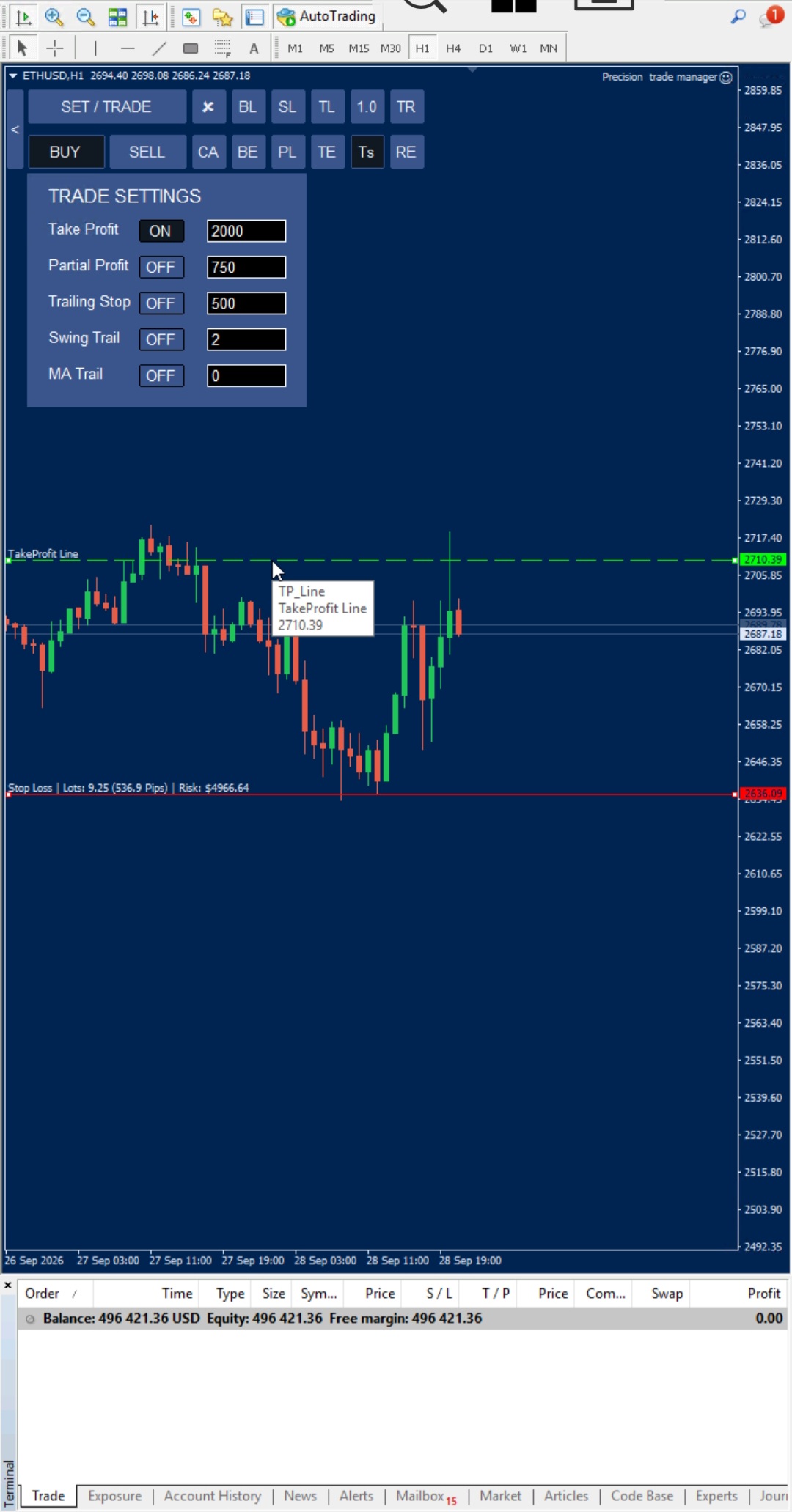
TP Manager EA: Manage Every Take-Profit With One Line
Click TP and the EA draws a single green take-profit manager line on the chart. Drag the line to your desired price while watching your total live profit update in real time. Click TP again and the take-profit level is applied to every applicable open order in that direction.
This makes take-profit management much faster when you are managing many positions at the same time. Instead of opening and modifying each order manually, you can manage multiple take-profits through one simple line.
Individual Take-Profit for Every Order
TP Manager EA also provides individual take-profit management. Open TS → Trade Settings and enable the Take Profit option. Each applicable order can then have its own dedicated Take Profit Line.
For example, if you have 50 open orders, each order can have its own take-profit price. One order can target one price while another order uses a completely different take-profit level. This gives you precise control over individual positions instead of forcing every order to use the same target.
You can therefore choose between individual take-profit management and centralized TP Manager control, depending on your trading workflow.
Two Ways to Manage Take-Profit
- Individual Take Profit: Enable Take Profit in TS → Trade Settings and give each order its own Take Profit Line.
- TP Manager: Use the TP Manager line to set or move the take-profit across multiple applicable orders at once.
- Flexible management: Use individual targets when every position needs a different exit price, or one TP Manager line when multiple orders should share the same take-profit level.
What Does TP Manager EA Do?
- Draws a draggable green take-profit manager line
- Shows total live profit while the TP line is being positioned
- Updates the take-profit of multiple open orders with one click
- Allows individual orders to have their own Take Profit Line
- Supports different take-profit levels for different open orders
- Works with orders that already have a take-profit and orders that do not
- Applies the TP Manager to the selected trading direction
- Removes the TP Manager line automatically after the update is completed
How TP Manager EA Works
- Click TP on the EA.
- A take-profit manager line appears on the chart.
- Drag the line to your desired take-profit level.
- Watch your total live profit update while moving the line.
- Click TP again to confirm the new level.
- The take-profit is updated across the applicable open orders.
- The manager line disappears automatically after the update.
How to Set an Individual Take-Profit
- Open TS → Trade Settings.
- Enable the Take Profit option.
- Each applicable order receives its own dedicated Take Profit Line.
- Move each line to the desired price for that order.
- Each position can now have its own individual take-profit level.
TP Manager EA vs Manual Take-Profit Management
| Manual Take-Profit Management | TP Manager EA |
|---|---|
| Modify each order separately | Manage multiple orders with one TP Manager line |
| Difficult to manage many positions quickly | Fast centralized take-profit management |
| Different targets require repeated manual changes | Each order can have its own Take Profit Line |
| No convenient live total-profit view while positioning each target | Total live profit is displayed while moving the TP Manager line |
Frequently Asked Questions
Can every order have its own take-profit?
Yes. Enable Take Profit through TS → Trade Settings. Each applicable order can then have its own dedicated Take Profit Line and individual take-profit price.
Can I manage all take-profits with one line?
Yes. The TP Manager EA can manage the take-profit of multiple applicable open orders with one TP Manager line. This is useful when you want several positions to use the same take-profit level.
Can I have 50 orders with 50 different take-profit levels?
Yes. Each order can have its own individual Take Profit Line, allowing every position to use a different take-profit price.
Can I use individual take-profit and TP Manager?
Yes. The EA provides both individual and centralized take-profit management. You can use individual Take Profit Lines when separate targets are required and the TP Manager when you want to manage multiple orders together.
Does TP Manager work with orders that already have a take-profit?
Yes. The TP Manager can update applicable orders whether they already have a take-profit or do not have one.
Does TP Manager affect buy and sell orders together?
No. The TP Manager line applies to the trading direction selected by its position on the chart. The opposite direction remains unaffected.
Is there a limit to how many orders TP Manager can update?
The TP Manager is designed to manage multiple open orders at once, making it suitable for accounts with many simultaneous positions.
What happens to the TP Manager line after the update?
The line is automatically removed after the take-profit update process is completed.
Does TP Manager work with MetaTrader 4 and MetaTrader 5?
Yes. TP Manager EA is designed for both MetaTrader 4 and MetaTrader 5, provided the broker supports the relevant MetaTrader platform.
Manage Take-Profit Faster With TP Manager EA
Whether you need a different take-profit for every position or want to manage multiple open orders with one line, TP Manager EA provides both approaches in one professional MetaTrader trade management tool.
[CTA Button: Download / Buy Now / View Pricing]
Related Tools
Pair the TP Manager EA with the SL Manager to manage stop-loss levels, or use the Partial Manager to manage partial profit closing across multiple open orders.
TP Manager EA helps reduce repetitive manual trade management and gives traders a faster way to manage take-profit levels across multiple live positions.