
Trade Manager MT5 MT4 License Management works around one simple idea: your license is tied to a single trading account number at any given moment, and you’re always in control of switching it. Understanding how account activation and license management work before you buy helps you avoid confusion later.
Trade Manager MT5 MT4 License Management: One Account Number, Changeable Every 12 Hours
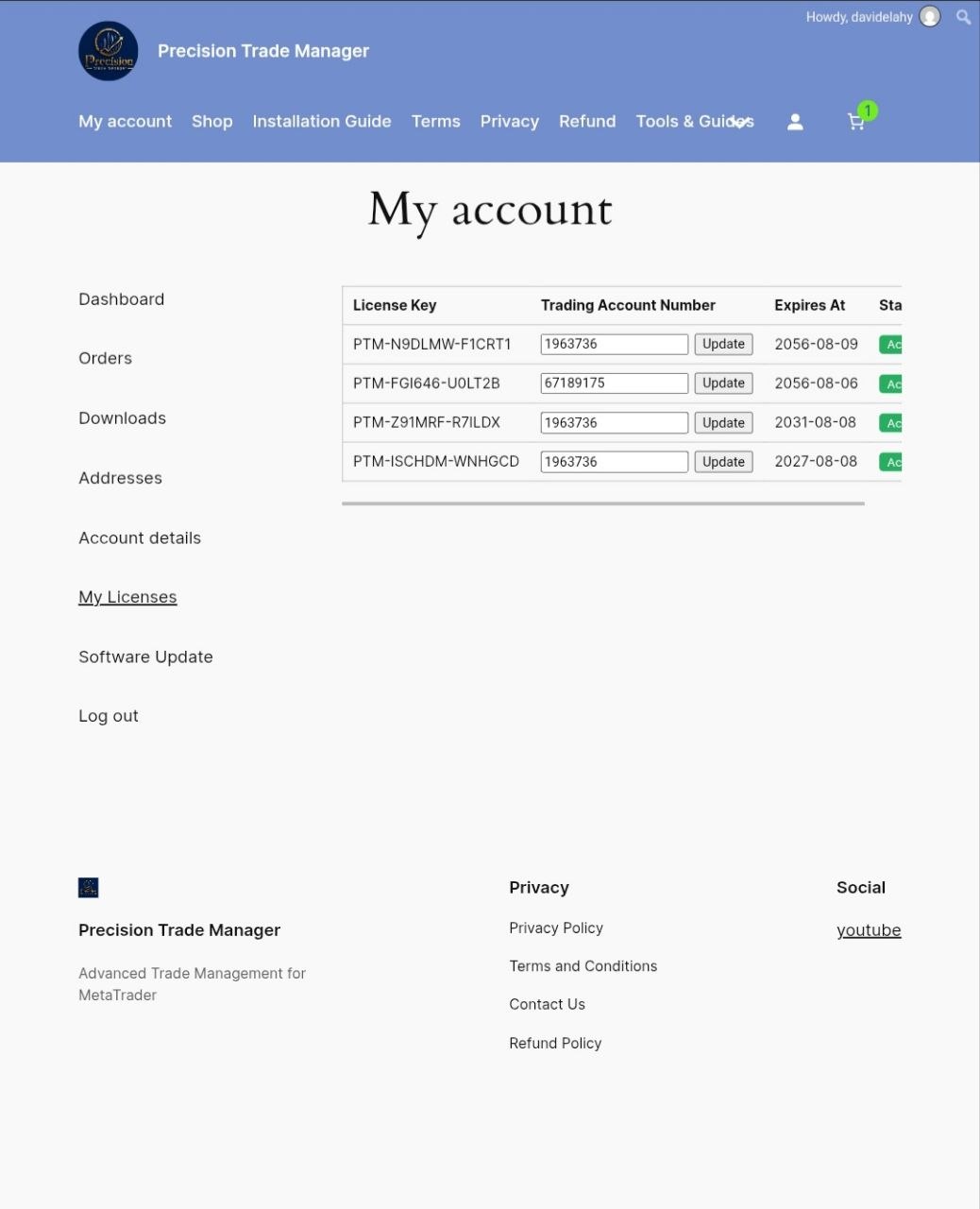
Each license is tied to a single trading account number at any given moment. Whether you’re switching to a new real account or testing on a fresh demo, simply go to My Account → My License, enter your new account number, and click Update.
You can change your linked account number once every 12 hours, and your license will instantly apply to the new account with no need to contact support or wait for approval.
What Does Trade Manager MT5 MT4 License Management Actually Do?
- Each license is linked to one account number at a time — real or demo.
- Change your linked account number once every 12 hours from My Account → My License.
- Updates apply instantly after clicking the Update button — no waiting, no support ticket required.
- You may switch between real and demo accounts, provided at least 12 hours have passed since your last update.
Why This Matters Before You Buy
A lot of traders run their strategy on a demo account first, then move to a funded real account once they’re confident — and some run multiple accounts with different brokers depending on execution quality.
That’s exactly why Trade Manager MT5 MT4 License Management is built around that reality: instead of locking you permanently to one account number, it lets you reassign the license yourself, on your own schedule, without any back-and-forth with support. This approach also means you’re never charged extra or asked to purchase a second license just because your trading setup evolved over time.
How to Update Your License Account
- Log in to your account on the website.
- Go to My Account → My License.
- Enter the new account number you want the license linked to (available after the 12-hour cool-down).
- Click Update — your license is instantly active on the new account.
Frequently Asked Questions
Can I use my Trade Manager MT5 MT4 license on more than one account at the same time?
No. Each license is active on a single account number at any given moment. To use it on a different account, you can update your account number from My Account → My License once every 12 hours.
How long does it take for an account update to apply?
Updates are instant. As soon as you click Update, your license becomes active on the new account number. Please note that you must wait 12 hours before you are eligible to change the account number again.
Can I switch between a real account and a demo account?
Yes. You can update your linked account number to either a real or demo account, provided 12 hours have passed since your last update.
Do I need to contact support to change my account number?
No. You can update it yourself anytime from My Account → My License, subject to the 12-hour limit, with no waiting or approval required.
Built for Traders Who Change Setups
Trading conditions shift — you might close one broker account and open another with tighter spreads, or move your live strategy off a demo once it’s proven itself on MetaTrader.
Rather than forcing you to email support and wait days for a manual reassignment, Trade Manager MT5 MT4 License Management puts that control directly in your hands. The 12-hour limit exists purely to prevent abuse — sharing one license across many accounts simultaneously — while still giving legitimate traders the flexibility to move between setups as their needs change.
Manage Your Trade Manager MT5 MT4 License, Your Way
[CTA Button: Go to My Account]