
Break Even From Behind – TB Break-Even MT4 MT5
Break Even From Behind is an advanced trade management feature in Precision Trade Manager for MT4 and MT5. It is designed to manage an existing position when price reverses back toward a level placed behind the current price.
Instead of waiting for price to reach a conventional Break-Even level from the front, you can place a TB line behind the current price. When price reverses and touches the line from the correct direction, Precision Trade Manager can manage the position automatically.
Precision Trade Manager is designed for MetaTrader 4 and MetaTrader 5, the trading platforms developed by MetaQuotes .
The TB system provides two different behaviors depending on whether the position is in profit or loss.
Profit → Break-Even
Loss → TP at Entry
Why Is It Called TB?
The name TB represents the two main ways this feature can help manage a position.
When the position is in profit, TB uses Break-Even to protect the result of the trade.
When the position is still in loss, TB can place the Take Profit exactly at the original entry price, giving the trade an opportunity to escape the loss if price returns to the entry level.
This is why TB is more than a conventional Break-Even tool. It can manage both profitable and losing positions when price reverses from behind.
How to Activate Break Even From Behind
To activate this feature, press the TE button in Precision Trade Manager.
The TE panel opens with three buttons. Press TB to create the TB line on the chart.
The TB line appears as a horizontal Yellow-Green dotted line.
You can drag the line to the level where you want the reversal to trigger the trade-management action.
The key principle is simple: the TB line is placed behind the current price.
Advanced Target with TL & TE_LINE:
If you enter the market at a price and anticipate that the price may not fully return to your entry level in Loss Break-Even mode, you can press the TL button in the panel to place a TE_LINE on the chart.
When the TB line is touched by price, all open Take Profit levels will be automatically transferred to the price of the TE_LINE, and both lines will be removed from the chart.
If no TE_LINE is present on the chart, the system defaults to the standard TB behavior.
Break Even From Behind for Buy Positions
For a Buy position, the TB line is placed below the current price.
After price has moved above the TB line, a valid TB trigger occurs when price reverses from above to below and reaches the TB line.
The sequence is:
Buy → TB below price → price reverses downward → TB is touched → position is managed
The TB line is therefore behind the current price, not in front of it.
Break Even From Behind for Sell Positions
For a Sell position, the TB line is placed above the current price.
After price has moved below the TB line, a valid TB trigger occurs when price reverses from below to above and reaches the TB line.
The sequence is:
Sell → TB above price → price reverses upward → TB is touched → position is managed
How the Break Even From Behind Trigger Works
TB is specifically designed to respond to a price reversal toward a line that is already behind the current price.
- Buy: the TB line is below the current price and the valid reversal is from above to below.
- Sell: the TB line is above the current price and the valid reversal is from below to above.
This directional behavior is what makes TB different from simply placing a standard Break-Even level on the chart.
Break Even From Behind When the Position Is in Profit
When price reaches the TB line and the position is in profit, Precision Trade Manager can manage the trade using Break-Even.
In this mode, the Break-Even level is calculated with Commission and Swap included.
This means the Take Profit is not simply placed at the raw opening price. The trading costs are taken into account when calculating the Break-Even level.
The objective is to protect the profitable position while accounting for the actual costs of the trade.
Position in Profit → Break-Even with Commission and Swap
Break Even From Behind When the Position Is in Loss
TB also provides a different behavior when the position is still losing.
If the position is in loss when the TB trigger occurs, Precision Trade Manager can place the Take Profit exactly at the original entry price.
In this Loss Break-Even mode, Commission and Swap are not added to the entry price.
The purpose is to give the losing position an opportunity to escape quickly if price returns to the original entry.
Position in Loss → TP exactly at Entry Price
Using TE_LINE with the TL Button for Custom Targets
If you estimate that price may not return all the way to your original entry level in Loss Break-Even mode, you can take advantage of the TE_LINE feature.
Simply press the TL button in the panel to place a TE_LINE on your chart at your desired custom target level.
When the TB line is touched by price:
-
If the TE_LINE exists on the chart, all open Take Profit levels will instantly move to the price of the
TE_LINE, and both lines will be automatically deleted. - If the TE_LINE does not exist, the system functions according to its standard Loss Break-Even and Profit Break-Even routine.
Break-Even vs Loss Break-Even
| Mode | Position Status | TP Placement | Commission & Swap |
|---|---|---|---|
| TB Break-Even | Position is in profit | Calculated Break-Even level | Included |
| TB Loss Break-Even | Position is in loss | Exact original entry price | Not included |
Break Even From Behind – TB Loss Break-Even
Watch how TB handles a losing position when price reverses toward the TB line. The Take Profit is placed exactly at the original entry price, without adding Commission and Swap, allowing the trade to exit quickly if price returns.
Break Even From Behind on the Chart
The Yellow-Green dotted TB line provides a clear visual reference for the level behind the current price.
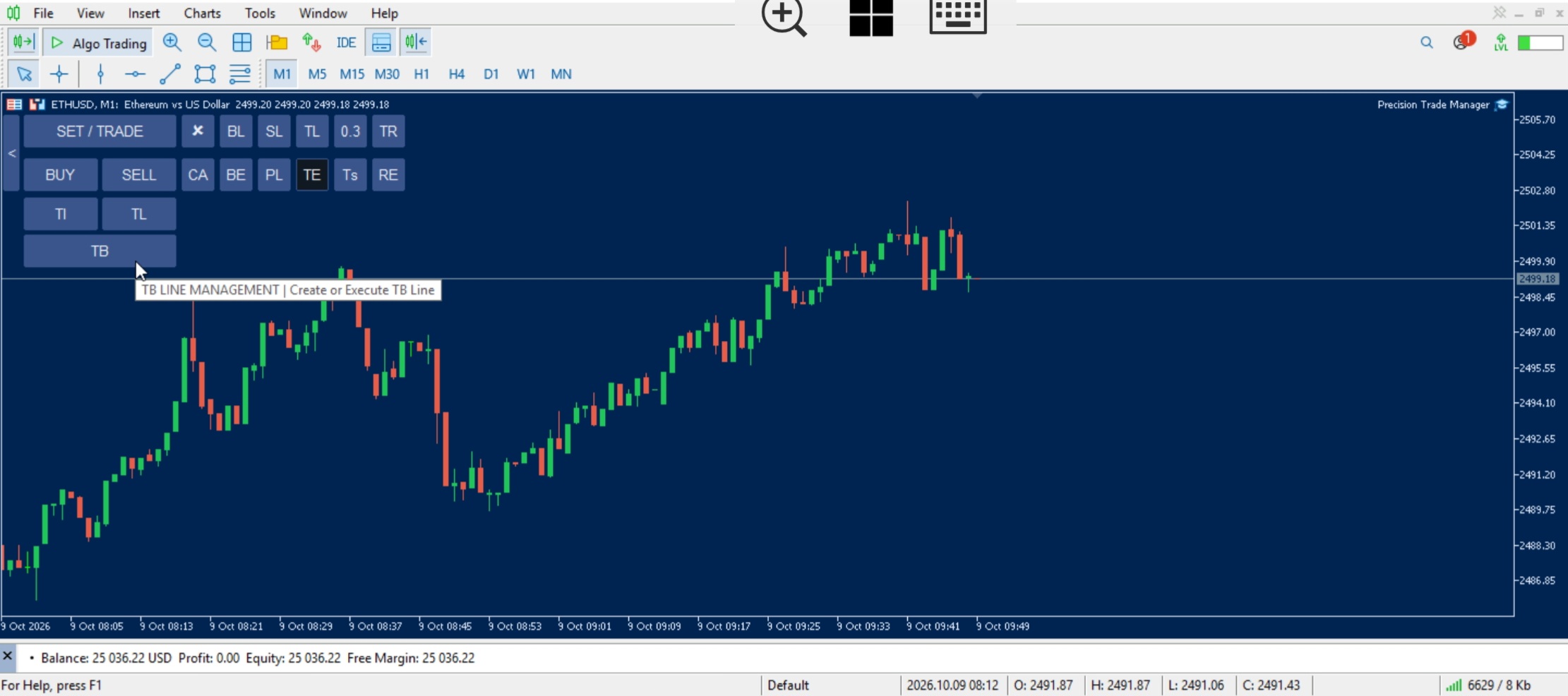
Break Even From Behind – TB Break-Even
Watch how Break Even From Behind works when price reverses toward the TB line and the position is in profit. TB manages the trade using Break-Even with Commission and Swap included in the calculation.
Break Even From Behind Buy Example
Imagine a Buy position opened at 3000.00. Price moves upward to 3020.00.
You place the TB line at 3010.00. The TB line is now below the current price and therefore behind the price for the Buy position.
If price reverses from 3020.00 toward 3010.00 and touches the TB line, the TB management logic is triggered.
If the position is in profit, the trade can be managed using Break-Even with Commission and Swap included.
If the position is still in loss, the TP can be placed
exactly at the original entry price (or at the TE_LINE if placed via the TL button).
Break Even From Behind Sell Example
Imagine a Sell position opened at 3000.00. Price moves downward to 2980.00.
You place the TB line at 2990.00. The TB line is now above the current price and therefore behind the price for the Sell position.
If price reverses from 2980.00 toward 2990.00 and touches the TB line, the TB management logic is triggered.
The position can then be managed using either
Break-Even, Loss Break-Even, or the custom TE_LINE target depending on your panel setup.
Why Use Break Even From Behind?
Price does not always move directly toward a target. A position can first move favorably and then reverse. A losing position can also recover after moving against you.
Break Even From Behind gives you a visual way to define the level at which you want the position to be managed if price reverses.
Instead of manually changing Take Profit levels as the market moves, you can place one TB line behind the current price and let Precision Trade Manager handle the position when price returns to that level.
TB is a trade management feature, not a trading signal or entry system. It does not determine when to enter a trade. It provides an additional method for managing an existing position.
Break Even From Behind Quick Summary
Buy: TB below price → price reverses downward → TB is touched → position is managed.
Sell: TB above price → price reverses upward → TB is touched → position is managed.
Profit: Break-Even with Commission and Swap included.
Loss: TP exactly at the original entry
price (or transferred to TE_LINE via TL button if active).
Related Precision Trade Manager Features
Explore other trade management tools available for MetaTrader 4 and MetaTrader 5.
- Interactive Break-Even EA
- Loss Break-Even EA MT5 MT4
- Trade Manager MT5 MT4 – Complete User Manual
- Risk Manager EA MT5 MT4
- Cancel Pending Orders When Price Touches a Line
Manage Price Reversals With Break Even From Behind
Place the Yellow-Green TB line behind the current price and let Precision Trade Manager manage the position when price reverses toward that level.
Profit → Break-Even.
Loss → TP at Entry (or TE_LINE Target).