
Trade Manager MT5 MT4 BETE Trendline solves a problem every trader knows: price can move against your position slowly, over several candles, without ever triggering a clear signal to act.
Watching every timeframe manually to catch the exact moment a trend breaks — and then deciding whether to lock in profit, avoid a loss, or cancel pending orders — takes constant attention you don’t always have. Trade Manager MT5 MT4 handles this decision for you, automatically.
Table of Contents
Trade Manager MT5 MT4 BETE Trendline: One Trendline, Fully Automated Decisions
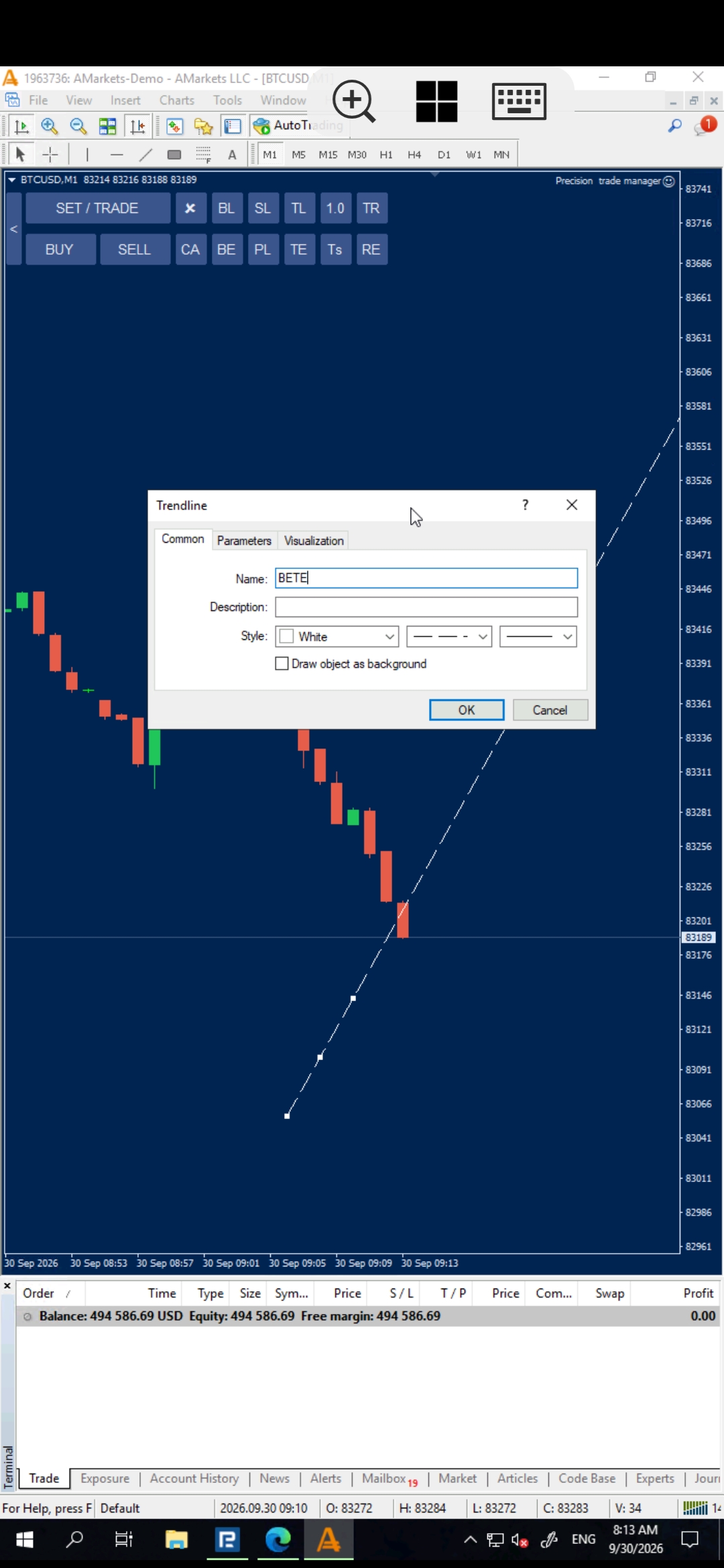
Draw a trendline on your chart and rename it “BETE.” Then select the timeframe you want the EA to monitor for candle closes. From that point on, the EA watches every candle close on that timeframe automatically.
If a candle closes against both your entry direction and the direction of the BETE trendline, the EA automatically takes action: if your position is in profit, it moves to breakeven; if it’s in loss, it applies Loss Breakeven, moving the take-profit to the zero-cost exit point. At the same time, any pending orders are closed and deleted automatically.
If you want the BETE trendline to be removed after a Partial operation, simply create a standard MetaTrader Text Object on the chart and enter DB as the text. After the Partial operation is completed, the EA will automatically remove the BETE trendline.
What Does Trade Manager MT5 MT4 BETE Trendline Actually Do?
- Monitors candle closes on your chosen timeframe against a trendline you draw and name “BETE”
- Triggers only when a candle closes against both your entry direction and the trendline’s direction
- If the position is in profit at that moment, moves it to breakeven automatically
- If the position is in loss at that moment, applies Loss Breakeven, moving the take-profit to the zero-cost exit point
- Automatically closes and deletes any pending orders the moment the condition is triggered
- Allows the BETE trendline to be removed after a Partial operation by using a standard MetaTrader Text Object containing DB
- Part of the wider Trade Manager MT5 MT4 toolkit, so it runs fully automatically once set up — no manual monitoring required
How It Works (Step-by-Step Guide)
- Draw a trendline on your chart in the direction you want to monitor
- Rename the trendline to “BETE”
- In the EA’s input settings, select the timeframe whose candle closes should be monitored
- If a candle on that timeframe closes against both your entry direction and the BETE trendline’s direction, the EA acts automatically
- A profitable position is moved to breakeven; a losing position has its take-profit moved to the Loss Breakeven zero-cost exit point
- Any pending orders are closed and deleted automatically at the same moment
How to Remove BETE After Partial
If you want the BETE trendline to be removed after a Partial operation, simply create a standard MetaTrader Text Object on the chart and enter DB as the text.
After the Partial operation is completed, the EA will automatically remove the BETE trendline.
How to set it up:
- Open the standard Text tool in MetaTrader.
- Create a Text Object on the chart.
- Enter DB as the text.
- Keep the BETE trendline on the chart.
- When the Partial operation is completed, the EA will automatically remove the BETE trendline.
Why This Beats Manually Watching for a Trend Break
| Manual Monitoring | Trade Manager MT5 MT4 BETE Trendline |
|---|---|
| Requires watching multiple timeframes for a candle close against your trend | Monitors candle closes automatically on your chosen timeframe |
| Manually deciding between breakeven, loss breakeven, or canceling pending orders | Automatically applies the correct action based on whether the trade is in profit or loss |
| Pending orders left active even after the trend condition breaks | Pending orders closed and deleted automatically the moment the condition triggers |
| Manually managing the BETE trendline after a Partial operation | Enter DB as a standard MetaTrader Text Object to have the BETE trendline removed after the Partial operation |
Frequently Asked Questions
What is Trade Manager MT5 MT4 BETE Trendline?
It’s a feature built around a regular trendline you draw on your chart and rename to “BETE.” Trade Manager MT5 MT4 uses its direction, combined with your chosen timeframe’s candle closes, to decide when to act.
What exactly triggers the EA to act?
A candle closing, on your selected timeframe, against both your entry direction and the direction of the BETE trendline.
What happens if my position is in profit when the condition triggers?
The EA moves it to breakeven, protecting your entry price.
What happens if my position is in loss when the condition triggers?
The EA applies Loss Breakeven, moving the take-profit to the zero-cost exit point so you avoid taking a loss.
What happens to my pending orders?
Any pending orders are automatically closed and deleted the moment the condition is triggered.
How can I remove the BETE trendline after a Partial operation?
If you want the BETE trendline to be removed after a Partial operation, simply create a standard MetaTrader Text Object on the chart and enter DB as the text. After the Partial operation is completed, the EA will automatically remove the BETE trendline.
Does this work with all brokers?
Yes, as long as your broker supports MetaTrader 5 or MetaTrader 4.
Let One Trendline Make the Decision for You
[CTA Button: Download / Buy Now / View Pricing]
Related Tools
Trade Manager MT5 MT4 BETE Trendline works hand-in-hand with Breakeven and Loss Breakeven, and pairs well with Pending Order for a fully automated trade lifecycle.